# Open Gateway for Developers Documentation
## Guides
- [API Architecture](https://developers.opengateway.telefonica.com/docs/architecture.md): The Open Gateway API Architecture is a cutting-edge framework designed to enable seamless integration of advanced network capabilities and services into your applications. Developed by the GSMA in collaboration with leading telecommunications operators, aggregators, cloud providers, and other telcos, this architecture focuses on promoting interoperability, enhancing innovation, and improving operational efficiency. By leveraging standardized APIs, the Open Gateway architecture empowers developers to create robust, scalable, and high-performance applications.
- [CAMARA project](https://developers.opengateway.telefonica.com/docs/camara.md): CAMARA is an open-source initiative under the Linux Foundation focused on defining, developing, and testing telecom APIs. In collaboration with the GSMA Operator Platform Group, CAMARA ensures that API requirements are aligned, and API definitions are published for industry-wide use. The project achieves API harmonization by rapidly creating working code and providing developer-friendly documentation. All API definitions and reference implementations are available for free under the Apache 2.0 license.
- [Glossary of Terms](https://developers.opengateway.telefonica.com/docs/glossary.md): Reference guide to key terms and concepts used in the Open Gateway API documentation
- [The Open Gateway Initiative](https://developers.opengateway.telefonica.com/docs/initiative.md): Welcome to Open Gateway APIs, your gateway to leveraging advanced network capabilities in your applications. Whether you're a seasoned developer or just starting your journey, Open Gateway APIs provide the tools and resources you need to create innovative, high-performance applications.
- [Privacy by Design](https://developers.opengateway.telefonica.com/docs/privacy.md): Open Gateway as an industry initiative has been designed with end-user's privacy in mind, to provide developers with telco capabilities while ensuring user data privacy and security.
- [API Integration](https://developers.opengateway.telefonica.com/docs/apiintegration.md): In this guide we will go through the different ways to integrate with Open Gateway APIs so you can find the best fit for your use case and the offering from our Channel Partners.
- [Auth Code Flow 2.0 vs CIBA](https://developers.opengateway.telefonica.com/docs/auth-code-flow-20-vs-ciba.md)
- [Backend authorization flow](https://developers.opengateway.telefonica.com/docs/backend.md): If your use case does not involve end-user's interaction you will want to integrate with Open Gateway APIs from the backend. This guide will help you understand the flows to get your application authorized to call the APIs from your server or any other environment without a human interface.
- [Frontend authorization flow](https://developers.opengateway.telefonica.com/docs/frontend.md): If your application offers a human interface to provide your users with features enabled by Open Gateway, this is its frontend component, running on the end-user's device, that will trigger the API calling flow. This guide will show you how to authorize your application by identifying the end-user from their network connected devices.
- [Authorization](https://developers.opengateway.telefonica.com/docs/authorization.md): In this guide you will find a briefly introduction to authorization mechanisms and best practices for secure access to Open Gateway APIs
- [Age Verification API](https://developers.opengateway.telefonica.com/docs/ageverification.md): The Age Verification API lets businesses determine whether a user is above the required age threshold for regulated services using mobile operator-verified data.
- [Sample code for Age Verification](https://developers.opengateway.telefonica.com/docs/samplecode_ageverification.md): The following samples show how to use the [Open Gateway Age Verification API](https://opengateway.telefonica.com/en/apis/age-verification) to check if a subscriber meets a required age threshold, optionally including content lock or parental control information.
- [Device Location Verification API](https://developers.opengateway.telefonica.com/docs/devicelocation.md): The Location Verification API lets you verify whether a SIM-based device is within a requested geographic area without relying on GPS.
- [Sample code for Device Location Verification](https://developers.opengateway.telefonica.com/docs/samplecode_devicelocation.md): The following samples show how to use the [Open Gateway Device Location Verification API](https://opengateway.telefonica.com/en/apis/device-location),
- [Device Status API](https://developers.opengateway.telefonica.com/docs/devicestatus.md): The Device Roaming Status API makes it possible to check the roaming status of a specific SIM-based device using operator network events.
- [Sample code for Device Status](https://developers.opengateway.telefonica.com/docs/samplecode_devicestatus.md): The following samples show how to use the [Open Gateway Device Status API](https://opengateway.telefonica.com/en/apis/device-status), to control your resource management during international roaming more securely
- [Device Swap API](https://developers.opengateway.telefonica.com/docs/deviceswap.md): The Device Swap API helps detect unauthorised device changes for a mobile line, strengthening fraud prevention and identity protection.
- [Sample code for Device Swap](https://developers.opengateway.telefonica.com/docs/samplecode_deviceswap.md): The following samples show how to use the [Open Gateway Device Swap API](https://opengateway.telefonica.com/en/apis/device-swap),
- [Know Your Customer API](https://developers.opengateway.telefonica.com/docs/knowyourcustomer.md): The Know Your Customer - Match API validates user contact information against reliable mobile carrier data to reduce fraud and improve onboarding.
- [Sample code for KYC Match](https://developers.opengateway.telefonica.com/docs/samplecode_knowyourcustomer.md): The following samples show how to use the [Open Gateway Know Your Customer (KYC) API's Match operation](https://opengateway.telefonica.com/en/apis/kyc-match)
- [Number Verification API](https://developers.opengateway.telefonica.com/docs/numberverification.md): The Number Verification API increases the security of user identity and credentials by verifying phone numbers through the mobile network.
- [Sample code for Number Verification](https://developers.opengateway.telefonica.com/docs/samplecode_numberverification.md): The following samples show how to use the [Open Gateway Number Verification API](https://opengateway.telefonica.com/en/apis/number-verification), for fraud prevention purposes, in order to check if a given phone number matches the one on the SIM card installed in the end-user's device.
- [Quality on Demand API](https://developers.opengateway.telefonica.com/docs/qod.md): The Quality on Demand API lets developers control their customers' mobile connectivity to build better user experiences.
- [Sample code for QoD](https://developers.opengateway.telefonica.com/docs/samplecode_qod.md): The following samples show how to use the [Open Gateway Quality on Demand API](https://opengateway.telefonica.com/en/apis/qod-mobile) to optimize your user's mobile connectivity by creating sessions tailored to the type of network traffic generated by your app, and trigger it from the app itself, or from a backend on use cases where the end-devices don't run your app (e.g. drones, cameras, etc.).
- [Scam Signal API](https://developers.opengateway.telefonica.com/docs/scamsignal.md): The Scam Signal API enables companies to protect their customers from phishing and impersonation scams using telecom network intelligence.
- [SIM Swap API](https://developers.opengateway.telefonica.com/docs/simswap.md): The SIM Swap API lets you detect SIM exchange events for fraud prevention and stronger account protection.
- [Sample code for SIM Swap](https://developers.opengateway.telefonica.com/docs/samplecode_simswap.md): The following samples show how to use the [Open Gateway SIM Swap API](https://opengateway.telefonica.com/en/apis/sim-swap), for fraud prevention purposes, in order to check if a given mobile line, identified by its phone number, has gotten a SIM card swap lately.
- [Tenure API](https://developers.opengateway.telefonica.com/docs/tenure.md): The Line Tenure API lets businesses verify the actual age of a mobile line to strengthen fraud detection and identity validation.
- [Sample code for Tenure](https://developers.opengateway.telefonica.com/docs/samplecode_tenure.md): The following samples show how to use the [Open Gateway Tenure API](https://opengateway.telefonica.com/en/apis/tenure) to verify a specified length of tenure for a network subscriber to establish a level of trust for the network subscription identifier.
- [How to use the API reference](https://developers.opengateway.telefonica.com/docs/apireference.md): Find out how to start testing the Open Gateway APIs with our tools in the API Reference
- [Test the Sandbox with Postman](https://developers.opengateway.telefonica.com/docs/postmaninteraction.md): Learn how to explore the functionality of the Sandbox environment using Postman, this guide will demonstrate how to effectively interact with APIs in a controlled setting.
- [Join our Programs](https://developers.opengateway.telefonica.com/docs/programs.md): Find out how to start testing the Open Gateway APIs in our Sandbox or go commercial with one of our Channel Partners
- [Sandbox](https://developers.opengateway.telefonica.com/docs/sandbox.md): In this section you will find how to use the Telefónica Open Gateway Sandbox environment to test the Open Gateway APIs without the need to subscribe to a Channel Partner. Your tests won't be charged and won't be suitable for going into a production stage, so it is a great chance to learn and prototype, as a previous step to go commercial.
- [Sandbox mock responses](https://developers.opengateway.telefonica.com/docs/mocks.md): Get deterministic responses from our Sandbox environment when using the mock mode, according to the following guidelines.
- [Sandbox Python SDK reference](https://developers.opengateway.telefonica.com/docs/sdkreference.md): Reference guide to the Sandbox Python SDK on how to authorize, instantiate and use its service classes to access the Open Gateway APIs.
- [How to use the Sandbox](https://developers.opengateway.telefonica.com/docs/usethesandbox.md): Learn how to effectively use the Open Gateway Sandbox, a free and secure environment for testing and refining your applications with real-world API scenarios before deployment. Follow our step-by-step guide to maximize your development process and ensure a smooth transition to production.
- [Sandbox production line whitelist](https://developers.opengateway.telefonica.com/docs/whitelist.md): When using the Production mode, get familiar with our Sandbox's whitelist and how it's meant to guard our customer´s privacy.
## API Reference
- [Verify age threshold v0.1](https://developers.opengateway.telefonica.com/reference/verifyage.md): Verify that the age of the subscriber associated with a phone number is equal to or greater than the specified age threshold value. As it is possible that the person holding the contract and the end-user of the subscription may not be the same, the endpoint also admits a list of optional properties to be included in the request to improve the identification. The response may optionally include the `identityMatchScore` property with a value that indicates how certain it is that the information returned relates to the person that the API Client is requesting. To increase the reliability of the information returned, the API Provider may include in the response the `verifiedStatus` property, indicating whether the identity information in its possession has been verified against an identification document legally accepted as an age verification document. If the API Client indicates request properties `includeContentLock` or `includeParentalControl` with value `true` and the API Provider implements this functionality, then the response will also include `contentLock` and `parentalControl` properties to indicate if the subscription has any kind of content filtering enabled. On the other hand, if the request properties are not included or the API Client specifies value `false`, then the response properties will not be returned. If the API Provider doesn't implement this functionality, request properties will be ignored and response properties won't be returned in any case. Check the [Authorization guide](/docs/authorization) on how to get an OAuth2 token, with the following scope: `dpv:FraudPreventionAndDetection kyc-age-verification:verify` Create an app on our [Sandbox](/docs/sandbox) to get credentials and [retrieve tokens](/reference/authorize) so you can perform API calls to our operators' production environments, or use the following convenience token to test in mock mode: `mock_sandbox_access_token`
- [Verify location v0.1](https://developers.opengateway.telefonica.com/reference/verifylocation-2.md): Verifies the location of a device with a given coordinates and accuracy Check the [Authorization guide](/docs/authorization) on how to get an OAuth2 token, with the following scope: `dpv:FraudPreventionAndDetection#device-location-read` Create an app on our [Sandbox](/docs/sandbox) to get credentials and [retrieve tokens](/reference/authorize) so you can perform API calls to our operators' production environments, or use the following convenience token to test in mock mode: `mock_sandbox_access_token` You can explore our [Device Location Verification sample code](/docs/samplecode_devicelocation) for additional guidance on using this API.
- [Check roaming status v0.4](https://developers.opengateway.telefonica.com/reference/getroamingstatus-2.md): Gets the current roaming status of a device and the country information Check the [Authorization guide](/docs/authorization) on how to get an OAuth2 token, with the following scope: `dpv:FraudPreventionAndDetection#device-status-roaming-read` Create an app on our [Sandbox](/docs/sandbox) to get credentials and [retrieve tokens](/reference/authorize) so you can perform API calls to our operators' production environments, or use the following convenience token to test in mock mode: `mock_sandbox_access_token` You can explore our [Device Status sample code](/docs/samplecode_devicestatus) for additional guidance on using this API.
- [Device Swap Check v0.1](https://developers.opengateway.telefonica.com/reference/checkdeviceswap-3.md): Check if device swap has been performed during a past period Check the [Authorization guide](/docs/authorization) on how to get an OAuth2 token, with the following scope: `dpv:FraudPreventionAndDetection#device-swap` Create an app on our [Sandbox](/docs/sandbox) to get credentials and [retrieve tokens](/reference/authorize) so you can perform API calls to our operators' production environments, or use the following convenience token to test in mock mode: `mock_sandbox_access_token` You can explore our [Device Swap sample code](/docs/samplecode_deviceswap) for additional guidance on using this API.
- [Device Swap Retrieve v0.1](https://developers.opengateway.telefonica.com/reference/retrievedeviceswapdate-3.md): Get timestamp of last device swap for a mobile user account provided with phone number. Check the [Authorization guide](/docs/authorization) on how to get an OAuth2 token, with the following scope: `dpv:FraudPreventionAndDetection#device-swap` Create an app on our [Sandbox](/docs/sandbox) to get credentials and [retrieve tokens](/reference/authorize) so you can perform API calls to our operators' production environments, or use the following convenience token to test in mock mode: `mock_sandbox_access_token` You can explore our [Device Swap sample code](/docs/samplecode_deviceswap) for additional guidance on using this API.
- [Verify match v0.2](https://developers.opengateway.telefonica.com/reference/kyc_match_v02-2.md): Check the [Authorization guide](/docs/authorization) on how to get an OAuth2 token, with the following scope: `dpv:FraudPreventionAndDetection#kyc-match:match` Create an app on our [Sandbox](/docs/sandbox) to get credentials and [retrieve tokens](/reference/authorize) so you can perform API calls to our operators' production environments, or use the following convenience token to test in mock mode: `mock_sandbox_access_token`
- [Check number recycling v0.1](https://developers.opengateway.telefonica.com/reference/checknumberrecycling.md): The API can be used to check whether the subscriber of the phone number has changed. A common scenario is when Application service provider (ASP) wants to check whether there has been a change in the user associated with the phone number after the specified date. This allows the ASP to ensure that a phone number is correctly linked to an user and prevent the mis-delivery of SMS messages. For example, below is a potential scenarios: * Scenario 1 * Pre-conditions * User A signed a contract with MNO A for the phone number '+123456789' on October 9, 2023, and is still using it. * User A also signed contracts with ASP A on December 22, 2023 for its services. * ASP A holds the contract date (2023-12-22) and the phone number (+123456789) for User A. * Currently, on November 2, 2024, ASP A wishes to send a SMS message to User A. * Potential operations * ASP A sends a request with specified date (2023-12-22) and phone number (+123456789) to the Number Recycling API. * The API response sets to 'false', indicating that there has not been a change in the user associated with the phone number. * Post-conditions * ASP A decides to send the SMS message to User A. * By following these steps, ASP A ensures that a phone number is linked to User A. 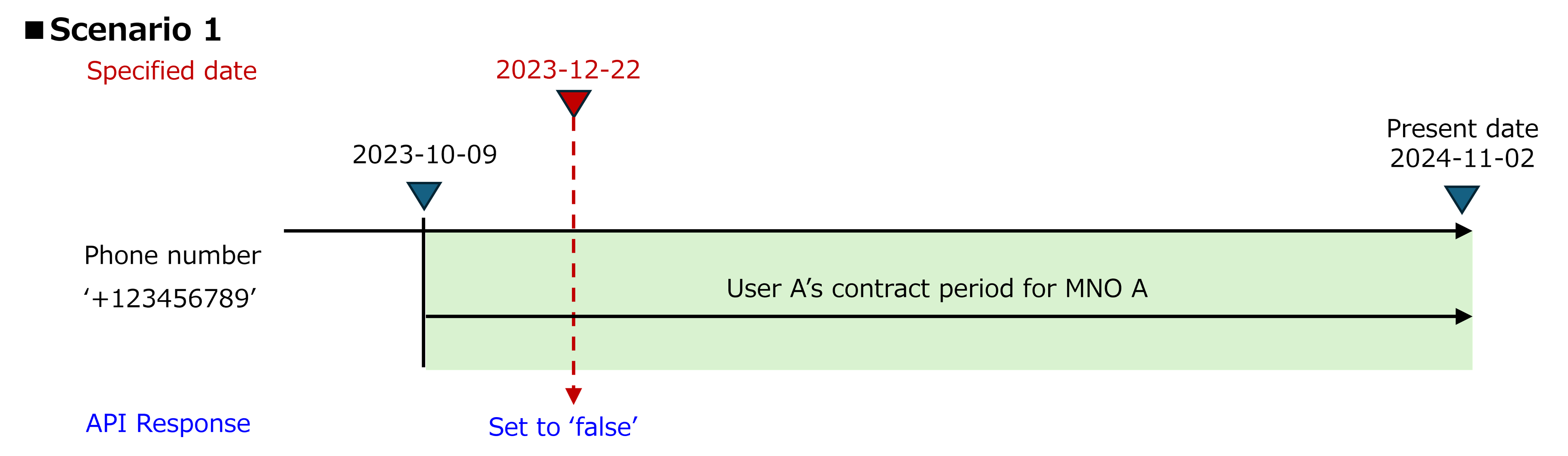 Note: * When API receives a request with specified date on which a user signed a contract with MNO, the API respond sets to 'false'(e.g., 2023-10-09 in the Scenario 1 of the figure above). * Scenario 2 * Pre-conditions * User A signed a contract with MNO A for the phone number '+123456789' on October 9, 2023, and canceled it on February 25, 2024. Subsequently, User B signed a contract with MNO A for the same phone number on September 21, 2024, and is still using it. * User A also signed contracts with ASP A on December 22, 2023 for its services. * ASP A holds the contract date (2023-12-22) and the phone number (+123456789) for User A. * Currently, on November 2, 2024, ASP A wishes to send a SMS message to User A. * Potential operations * ASP A sends a request with specified date (2023-12-22) and phone number (+123456789) to the Number Recycling API. * The API response sets to 'true', indicating that there has been a change in the user associated with the phone number. * Post-conditions * ASP A decides to stop sending the SMS message to User A and contacts User A by mail. * By following these steps, ASP A ensures that a phone number is not linked to User A and prevents the mis-delivery of the SMS message.
 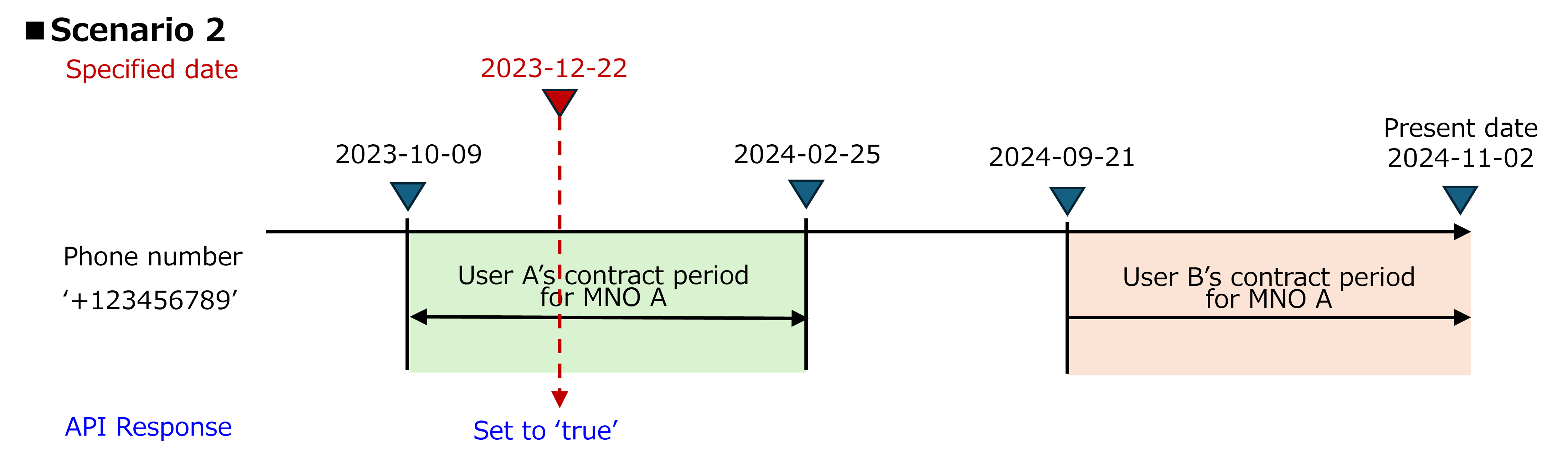 Note: * When the API receives a request with specified date during which there is no contract with MNO for the phone number, the API respond sets to 'true'(e.g., the period between 2024-02-25 and 2024-09-20 in the Scenario 2 of the figure above). # Authorization and authentication The "Camara Security and Interoperability Profile" provides details of how an API consumer requests an access token. Please refer to Identity and Consent Management (https://github.com/camaraproject/IdentityAndConsentManagement/) for the released version of the profile. The specific authorization flows to be used will be agreed upon during the onboarding process, happening between the API consumer and the API provider, taking into account the declared purpose for accessing the API, whilst also being subject to the prevailing legal framework dictated by local legislation. In cases where personal data is processed by the API and users can exercise their rights through mechanisms such as opt-in and/or opt-out, the use of three-legged access tokens is mandatory. This ensures that the API remains in compliance with privacy regulations, upholding the principles of transparency and user-centric privacy-by-design. # Identifying the phone number from the access token This API requires the API consumer to identify a phone number as the subject of the API as follows: - When the API is invoked using a two-legged access token, the subject will be identified from the optional `phoneNumber` field, which therefore MUST be provided. - When a three-legged access token is used however, this optional identifier MUST NOT be provided, as the subject will be uniquely identified from the access token. This approach simplifies API usage for API consumers using a three-legged access token to invoke the API by relying on the information that is associated with the access token and was identified during the authentication process. ## Error handling: - If the subject cannot be identified from the access token and the optional `phoneNumber` field is not included in the request, then the server will return an error with the `422 MISSING_IDENTIFIER` error code. - If the subject can be identified from the access token and the optional `phoneNumber` field is also included in the request, then the server will return an error with the `422 UNNECESSARY_IDENTIFIER` error code. This will be the case even if the same phone number is identified by these two methods, as the server is unable to make this comparison. Check the [Authorization guide](/docs/authorization) on how to get an OAuth2 token, with the following scope: `dpv:EnforceSecurity number-recycling:check` Create an app on our [Sandbox](/docs/sandbox) to get credentials and [retrieve tokens](/reference/authorize) so you can perform API calls to our operators' production environments, or use the following convenience token to test in mock mode: `mock_sandbox_access_token`
- [Get phone number v0.3](https://developers.opengateway.telefonica.com/reference/phonenumbershare.md): Returns the phone number associated with the access token so the API client can verify the number themselves. - It will be done for the user that has authenticated via mobile network and so their `sub` is in the access token - It returns the authenticated user's `device phone number` associated to the access token Check the [Authorization guide](/docs/authorization) on how to get an OAuth2 token, with the following scope: `dpv:FraudPreventionAndDetection#number-verification-share-read` Create an app on our [Sandbox](/docs/sandbox) to get credentials and [retrieve tokens](/reference/authorize) so you can perform API calls to our operators' production environments, or use the following convenience token to test in mock mode: `mock_sandbox_access_token` You can explore our [Number Verification sample code](/docs/samplecode_numberverification) for additional guidance on using this API.
- [Verify number v0.3](https://developers.opengateway.telefonica.com/reference/phonenumberverify.md): Verifies if the specified phone number (plain text or hashed format) matches the one associated with the access token. - The number verification will be done for the user that has authenticated via mobile network and so their `sub` is in the access token - It returns true/false depending on if the hashed phone number received as input matches the authenticated user's `device phone number` associated to the access token Check the [Authorization guide](/docs/authorization) on how to get an OAuth2 token, with the following scope: `dpv:FraudPreventionAndDetection#number-verification-verify-read` Create an app on our [Sandbox](/docs/sandbox) to get credentials and [retrieve tokens](/reference/authorize) so you can perform API calls to our operators' production environments, or use the following convenience token to test in mock mode: `mock_sandbox_access_token` You can explore our [Number Verification sample code](/docs/samplecode_numberverification) for additional guidance on using this API.
- [Auth Code Flow](https://developers.opengateway.telefonica.com/reference/authorize.md): Authorizes an application to access a resource from the user device Check the [Frontend authorization flow guide](/docs/frontend) for more information. Create an app on our [Sandbox](/docs/sandbox) to get credentials so you can perform API calls to our operators' production environments, or use the following convenience client ID to test it in mock mode: `mock_sandbox_app_id`
- [CIBA](https://developers.opengateway.telefonica.com/reference/bcauthorize.md): Authorizes an application to access a resource from the backend Check the [Backend authorization flow guide](/docs/backend) for more information. Create an app on our [Sandbox](/docs/sandbox) to get credentials so you can perform API calls to our operators' production environments, or use the following convenience client credentials to test it in mock mode: `mock_sandbox_app_id` / `mock_sandbox_app_secret` ## Available API Scopes Use the following scopes for different APIs: ### Age Verification - `dpv:FraudPreventionAndDetection kyc-age-verification:verify` ### Device Location - `dpv:FraudPreventionAndDetection#device-location-read` ### Device Status - `dpv:FraudPreventionAndDetection#device-status-roaming-read` ### Device Swap Detection - `dpv:FraudPreventionAndDetection#device-swap` ### Know Your Customer - `dpv:FraudPreventionAndDetection#kyc-match:match` ### Number Verification - `dpv:FraudPreventionAndDetection#number-verification-verify-read` ### Quality on Demand - `dpv:RequestedServiceProvision#qod` ### SIM Swap - `dpv:FraudPreventionAndDetection#sim-swap` ### Tenure - `dpv:FraudPreventionAndDetection#kyc-tenure`
- [/token](https://developers.opengateway.telefonica.com/reference/token.md): Retrieves an access token from the authorization code (frontend) or auth_req_id (backend) Check the [Authorization guide](/docs/authorization) for more information. Create an app on our [Sandbox](/docs/sandbox) to get credentials so you can perform API calls to our operators' production environments, or use the following convenience token to test our APIs in mock mode: `mock_sandbox_access_token`
- [Create QoD session v0.10](https://developers.opengateway.telefonica.com/reference/createsession-2.md): Create QoS Session to manage latency/throughput priorities If the qosStatus in the API response is "AVAILABLE" and a notification callback is provided the client will receive in addition to the response a `QOS_STATUS_CHANGED` event notification with `qosStatus` as `AVAILABLE`. If the `qosStatus` in the API response is `REQUESTED`, the client will receive either - a `QOS_STATUS_CHANGED` event notification with `qosStatus` as `AVAILABLE` after the network notifies that it has created the requested session, or - a `QOS_STATUS_CHANGED` event notification with `qosStatus` as `UNAVAILABLE` and `statusInfo` as `NETWORK_TERMINATED` after the network notifies that it has failed to provide the requested session. A `QOS_STATUS_CHANGED` event notification with `qosStatus` as `UNAVAILABLE` will also be send if the network terminates the session before the requested duration expired NOTE: in case of a `QOS_STATUS_CHANGED` event with `qosStatus` as `UNAVAILABLE` and `statusInfo` as `NETWORK_TERMINATED` the resources of the QoS session are not directly released, but will get deleted automatically at earliest 360 seconds after the event. This behavior allows clients which are not receiving notification events but are polling to get the session information with the `qosStatus` `UNAVAILABLE` (the `statusInfo` parameter is not included in the current version but will be adding to `SessionInfo` in an upcoming release). Before a client can attempt to create a new QoD session for the same device and flow period they must release the session resources with an explicit `delete` operation if not yet automatically deleted. Check the [Authorization guide](/docs/authorization) on how to get an OAuth2 token, with the following scope: `dpv:RequestedServiceProvision#qod` Create an app on our [Sandbox](/docs/sandbox) to get credentials and [retrieve tokens](/reference/authorize) so you can perform API calls to our operators' production environments, or use the following convenience token to test in mock mode: `mock_sandbox_access_token` You can explore our [QoD sample code](/docs/samplecode_qod) for additional guidance on using this API.
- [Cancel QoD session v0.10](https://developers.opengateway.telefonica.com/reference/deletesession-2.md): Release resources related to QoS session If the notification callback is provided and the `qosStatus` of the session was `AVAILABLE` the client will receive in addition to the response a `QOS_STATUS_CHANGED` event with - `qosStatus` as `UNAVAILABLE` and - `statusInfo` as `DELETE_REQUESTED` There will be no notification event if the `qosStatus` was already `UNAVAILABLE`. Check the [Authorization guide](/docs/authorization) on how to get an OAuth2 token, with the following scope: `dpv:RequestedServiceProvision#qod` Create an app on our [Sandbox](/docs/sandbox) to get credentials and [retrieve tokens](/reference/authorize) so you can perform API calls to our operators' production environments, or use the following convenience token to test in mock mode: `mock_sandbox_access_token`
- [Extend a QoD session v0.10](https://developers.opengateway.telefonica.com/reference/extendqossessionduration-2.md): Extend the overall duration of an active QoS session. If this operation is executed successfully, the new duration of the target session will be the original duration plus the additionally requested duration. The new remaining duration of the QoS session shall not exceed the maximum remaining duration limit (currently fixed at 86,400 seconds) where the remaining duration is calculated as the difference between the `expiresAt` and current time when the request to extend the session duration is received. If this maximum limit would be exceeded, the overall duration shall be set such that the remaining duration is equal to this limit. An example: A QoD session was originally created with duration 80,000 seconds. 10,000 seconds later, the developer requested to extend the session by 20,000 seconds. - Original duration: 80,000 seconds - Elapsed time: 10,000 seconds - Remaining duration: 70,000 seconds - New remaining duration: 86,400 seconds (the maximum allowed) - New overall session duration: 96,400 seconds Check the [Authorization guide](/docs/authorization) on how to get an OAuth2 token, with the following scope: `dpv:RequestedServiceProvision#qod` Create an app on our [Sandbox](/docs/sandbox) to get credentials and [retrieve tokens](/reference/authorize) so you can perform API calls to our operators' production environments, or use the following convenience token to test in mock mode: `mock_sandbox_access_token`
- [Check QoD session v0.10](https://developers.opengateway.telefonica.com/reference/getsession-2.md): Gets information about an active QoS session Check the [Authorization guide](/docs/authorization) on how to get an OAuth2 token, with the following scope: `dpv:RequestedServiceProvision#qod` Create an app on our [Sandbox](/docs/sandbox) to get credentials and [retrieve tokens](/reference/authorize) so you can perform API calls to our operators' production environments, or use the following convenience token to test in mock mode: `mock_sandbox_access_token`
- [Get QoS profile for a given name v0.10](https://developers.opengateway.telefonica.com/reference/getqosprofile-2.md): Returns a QoS Profile that matches the given name. Check the [Authorization guide](/docs/authorization) on how to get an OAuth2 token, with the following scope: `dpv:RequestedServiceProvision#qod` Create an app on our [Sandbox](/docs/sandbox) to get credentials and [retrieve tokens](/reference/authorize) so you can perform API calls to our operators' production environments, or use the following convenience token to test in mock mode: `mock_sandbox_access_token` You can explore our [QoD sample code](/docs/samplecode_qod) for additional guidance on using this API.
- [Get all QoS profiles v0.10](https://developers.opengateway.telefonica.com/reference/getqosprofiles-2.md): Returns all QoS Profiles that match the given criteria. If no criteria is given, all QoS Profiles are returned. Check the [Authorization guide](/docs/authorization) on how to get an OAuth2 token, with the following scope: `dpv:RequestedServiceProvision#qod` Create an app on our [Sandbox](/docs/sandbox) to get credentials and [retrieve tokens](/reference/authorize) so you can perform API calls to our operators' production environments, or use the following convenience token to test in mock mode: `mock_sandbox_access_token` You can explore our [QoD sample code](/docs/samplecode_qod) for additional guidance on using this API.
- [SIM Swap Check v0.4](https://developers.opengateway.telefonica.com/reference/checksimswap.md): Checks if SIM swap has been performed during a past period Check the [Authorization guide](/docs/authorization) on how to get an OAuth2 token, with the following scope: `dpv:FraudPreventionAndDetection#sim-swap` Create an app on our [Sandbox](/docs/sandbox) to get credentials and [retrieve tokens](/reference/authorize) so you can perform API calls to our operators' production environments, or use the following convenience token to test in mock mode: `mock_sandbox_access_token` You can explore our [SIM Swap sample code](/docs/samplecode_simswap) for additional guidance on using this API.
- [SIM Swap Retrieve v0.4](https://developers.opengateway.telefonica.com/reference/retrievesimswapdate.md): Gets the timestamp of last MSISDN <-> IMSI pairing change for a mobile user account provided with MSISDN. Check the [Authorization guide](/docs/authorization) on how to get an OAuth2 token, with the following scope: `dpv:FraudPreventionAndDetection#sim-swap` Create an app on our [Sandbox](/docs/sandbox) to get credentials and [retrieve tokens](/reference/authorize) so you can perform API calls to our operators' production environments, or use the following convenience token to test in mock mode: `mock_sandbox_access_token` You can explore our [SIM Swap sample code](/docs/samplecode_simswap) for additional guidance on using this API.
- [Check tenure length v0.1](https://developers.opengateway.telefonica.com/reference/checktenure.md): Verifies a specified duration of tenure, based on a provided date, for a network subscriber to establish a level of trust for the network subscription identifier. Check the [Authorization guide](/docs/authorization) on how to get an OAuth2 token, with the following scope: `dpv:FraudPreventionAndDetection#kyc-tenure` Create an app on our [Sandbox](/docs/sandbox) to get credentials and [retrieve tokens](/reference/authorize) so you can perform API calls to our operators' production environments, or use the following convenience token to test in mock mode: `mock_sandbox_access_token`
Note: * When the API receives a request with specified date during which there is no contract with MNO for the phone number, the API respond sets to 'true'(e.g., the period between 2024-02-25 and 2024-09-20 in the Scenario 2 of the figure above). # Authorization and authentication The "Camara Security and Interoperability Profile" provides details of how an API consumer requests an access token. Please refer to Identity and Consent Management (https://github.com/camaraproject/IdentityAndConsentManagement/) for the released version of the profile. The specific authorization flows to be used will be agreed upon during the onboarding process, happening between the API consumer and the API provider, taking into account the declared purpose for accessing the API, whilst also being subject to the prevailing legal framework dictated by local legislation. In cases where personal data is processed by the API and users can exercise their rights through mechanisms such as opt-in and/or opt-out, the use of three-legged access tokens is mandatory. This ensures that the API remains in compliance with privacy regulations, upholding the principles of transparency and user-centric privacy-by-design. # Identifying the phone number from the access token This API requires the API consumer to identify a phone number as the subject of the API as follows: - When the API is invoked using a two-legged access token, the subject will be identified from the optional `phoneNumber` field, which therefore MUST be provided. - When a three-legged access token is used however, this optional identifier MUST NOT be provided, as the subject will be uniquely identified from the access token. This approach simplifies API usage for API consumers using a three-legged access token to invoke the API by relying on the information that is associated with the access token and was identified during the authentication process. ## Error handling: - If the subject cannot be identified from the access token and the optional `phoneNumber` field is not included in the request, then the server will return an error with the `422 MISSING_IDENTIFIER` error code. - If the subject can be identified from the access token and the optional `phoneNumber` field is also included in the request, then the server will return an error with the `422 UNNECESSARY_IDENTIFIER` error code. This will be the case even if the same phone number is identified by these two methods, as the server is unable to make this comparison. Check the [Authorization guide](/docs/authorization) on how to get an OAuth2 token, with the following scope: `dpv:EnforceSecurity number-recycling:check` Create an app on our [Sandbox](/docs/sandbox) to get credentials and [retrieve tokens](/reference/authorize) so you can perform API calls to our operators' production environments, or use the following convenience token to test in mock mode: `mock_sandbox_access_token`
- [Get phone number v0.3](https://developers.opengateway.telefonica.com/reference/phonenumbershare.md): Returns the phone number associated with the access token so the API client can verify the number themselves. - It will be done for the user that has authenticated via mobile network and so their `sub` is in the access token - It returns the authenticated user's `device phone number` associated to the access token Check the [Authorization guide](/docs/authorization) on how to get an OAuth2 token, with the following scope: `dpv:FraudPreventionAndDetection#number-verification-share-read` Create an app on our [Sandbox](/docs/sandbox) to get credentials and [retrieve tokens](/reference/authorize) so you can perform API calls to our operators' production environments, or use the following convenience token to test in mock mode: `mock_sandbox_access_token` You can explore our [Number Verification sample code](/docs/samplecode_numberverification) for additional guidance on using this API.
- [Verify number v0.3](https://developers.opengateway.telefonica.com/reference/phonenumberverify.md): Verifies if the specified phone number (plain text or hashed format) matches the one associated with the access token. - The number verification will be done for the user that has authenticated via mobile network and so their `sub` is in the access token - It returns true/false depending on if the hashed phone number received as input matches the authenticated user's `device phone number` associated to the access token Check the [Authorization guide](/docs/authorization) on how to get an OAuth2 token, with the following scope: `dpv:FraudPreventionAndDetection#number-verification-verify-read` Create an app on our [Sandbox](/docs/sandbox) to get credentials and [retrieve tokens](/reference/authorize) so you can perform API calls to our operators' production environments, or use the following convenience token to test in mock mode: `mock_sandbox_access_token` You can explore our [Number Verification sample code](/docs/samplecode_numberverification) for additional guidance on using this API.
- [Auth Code Flow](https://developers.opengateway.telefonica.com/reference/authorize.md): Authorizes an application to access a resource from the user device Check the [Frontend authorization flow guide](/docs/frontend) for more information. Create an app on our [Sandbox](/docs/sandbox) to get credentials so you can perform API calls to our operators' production environments, or use the following convenience client ID to test it in mock mode: `mock_sandbox_app_id`
- [CIBA](https://developers.opengateway.telefonica.com/reference/bcauthorize.md): Authorizes an application to access a resource from the backend Check the [Backend authorization flow guide](/docs/backend) for more information. Create an app on our [Sandbox](/docs/sandbox) to get credentials so you can perform API calls to our operators' production environments, or use the following convenience client credentials to test it in mock mode: `mock_sandbox_app_id` / `mock_sandbox_app_secret` ## Available API Scopes Use the following scopes for different APIs: ### Age Verification - `dpv:FraudPreventionAndDetection kyc-age-verification:verify` ### Device Location - `dpv:FraudPreventionAndDetection#device-location-read` ### Device Status - `dpv:FraudPreventionAndDetection#device-status-roaming-read` ### Device Swap Detection - `dpv:FraudPreventionAndDetection#device-swap` ### Know Your Customer - `dpv:FraudPreventionAndDetection#kyc-match:match` ### Number Verification - `dpv:FraudPreventionAndDetection#number-verification-verify-read` ### Quality on Demand - `dpv:RequestedServiceProvision#qod` ### SIM Swap - `dpv:FraudPreventionAndDetection#sim-swap` ### Tenure - `dpv:FraudPreventionAndDetection#kyc-tenure`
- [/token](https://developers.opengateway.telefonica.com/reference/token.md): Retrieves an access token from the authorization code (frontend) or auth_req_id (backend) Check the [Authorization guide](/docs/authorization) for more information. Create an app on our [Sandbox](/docs/sandbox) to get credentials so you can perform API calls to our operators' production environments, or use the following convenience token to test our APIs in mock mode: `mock_sandbox_access_token`
- [Create QoD session v0.10](https://developers.opengateway.telefonica.com/reference/createsession-2.md): Create QoS Session to manage latency/throughput priorities If the qosStatus in the API response is "AVAILABLE" and a notification callback is provided the client will receive in addition to the response a `QOS_STATUS_CHANGED` event notification with `qosStatus` as `AVAILABLE`. If the `qosStatus` in the API response is `REQUESTED`, the client will receive either - a `QOS_STATUS_CHANGED` event notification with `qosStatus` as `AVAILABLE` after the network notifies that it has created the requested session, or - a `QOS_STATUS_CHANGED` event notification with `qosStatus` as `UNAVAILABLE` and `statusInfo` as `NETWORK_TERMINATED` after the network notifies that it has failed to provide the requested session. A `QOS_STATUS_CHANGED` event notification with `qosStatus` as `UNAVAILABLE` will also be send if the network terminates the session before the requested duration expired NOTE: in case of a `QOS_STATUS_CHANGED` event with `qosStatus` as `UNAVAILABLE` and `statusInfo` as `NETWORK_TERMINATED` the resources of the QoS session are not directly released, but will get deleted automatically at earliest 360 seconds after the event. This behavior allows clients which are not receiving notification events but are polling to get the session information with the `qosStatus` `UNAVAILABLE` (the `statusInfo` parameter is not included in the current version but will be adding to `SessionInfo` in an upcoming release). Before a client can attempt to create a new QoD session for the same device and flow period they must release the session resources with an explicit `delete` operation if not yet automatically deleted. Check the [Authorization guide](/docs/authorization) on how to get an OAuth2 token, with the following scope: `dpv:RequestedServiceProvision#qod` Create an app on our [Sandbox](/docs/sandbox) to get credentials and [retrieve tokens](/reference/authorize) so you can perform API calls to our operators' production environments, or use the following convenience token to test in mock mode: `mock_sandbox_access_token` You can explore our [QoD sample code](/docs/samplecode_qod) for additional guidance on using this API.
- [Cancel QoD session v0.10](https://developers.opengateway.telefonica.com/reference/deletesession-2.md): Release resources related to QoS session If the notification callback is provided and the `qosStatus` of the session was `AVAILABLE` the client will receive in addition to the response a `QOS_STATUS_CHANGED` event with - `qosStatus` as `UNAVAILABLE` and - `statusInfo` as `DELETE_REQUESTED` There will be no notification event if the `qosStatus` was already `UNAVAILABLE`. Check the [Authorization guide](/docs/authorization) on how to get an OAuth2 token, with the following scope: `dpv:RequestedServiceProvision#qod` Create an app on our [Sandbox](/docs/sandbox) to get credentials and [retrieve tokens](/reference/authorize) so you can perform API calls to our operators' production environments, or use the following convenience token to test in mock mode: `mock_sandbox_access_token`
- [Extend a QoD session v0.10](https://developers.opengateway.telefonica.com/reference/extendqossessionduration-2.md): Extend the overall duration of an active QoS session. If this operation is executed successfully, the new duration of the target session will be the original duration plus the additionally requested duration. The new remaining duration of the QoS session shall not exceed the maximum remaining duration limit (currently fixed at 86,400 seconds) where the remaining duration is calculated as the difference between the `expiresAt` and current time when the request to extend the session duration is received. If this maximum limit would be exceeded, the overall duration shall be set such that the remaining duration is equal to this limit. An example: A QoD session was originally created with duration 80,000 seconds. 10,000 seconds later, the developer requested to extend the session by 20,000 seconds. - Original duration: 80,000 seconds - Elapsed time: 10,000 seconds - Remaining duration: 70,000 seconds - New remaining duration: 86,400 seconds (the maximum allowed) - New overall session duration: 96,400 seconds Check the [Authorization guide](/docs/authorization) on how to get an OAuth2 token, with the following scope: `dpv:RequestedServiceProvision#qod` Create an app on our [Sandbox](/docs/sandbox) to get credentials and [retrieve tokens](/reference/authorize) so you can perform API calls to our operators' production environments, or use the following convenience token to test in mock mode: `mock_sandbox_access_token`
- [Check QoD session v0.10](https://developers.opengateway.telefonica.com/reference/getsession-2.md): Gets information about an active QoS session Check the [Authorization guide](/docs/authorization) on how to get an OAuth2 token, with the following scope: `dpv:RequestedServiceProvision#qod` Create an app on our [Sandbox](/docs/sandbox) to get credentials and [retrieve tokens](/reference/authorize) so you can perform API calls to our operators' production environments, or use the following convenience token to test in mock mode: `mock_sandbox_access_token`
- [Get QoS profile for a given name v0.10](https://developers.opengateway.telefonica.com/reference/getqosprofile-2.md): Returns a QoS Profile that matches the given name. Check the [Authorization guide](/docs/authorization) on how to get an OAuth2 token, with the following scope: `dpv:RequestedServiceProvision#qod` Create an app on our [Sandbox](/docs/sandbox) to get credentials and [retrieve tokens](/reference/authorize) so you can perform API calls to our operators' production environments, or use the following convenience token to test in mock mode: `mock_sandbox_access_token` You can explore our [QoD sample code](/docs/samplecode_qod) for additional guidance on using this API.
- [Get all QoS profiles v0.10](https://developers.opengateway.telefonica.com/reference/getqosprofiles-2.md): Returns all QoS Profiles that match the given criteria. If no criteria is given, all QoS Profiles are returned. Check the [Authorization guide](/docs/authorization) on how to get an OAuth2 token, with the following scope: `dpv:RequestedServiceProvision#qod` Create an app on our [Sandbox](/docs/sandbox) to get credentials and [retrieve tokens](/reference/authorize) so you can perform API calls to our operators' production environments, or use the following convenience token to test in mock mode: `mock_sandbox_access_token` You can explore our [QoD sample code](/docs/samplecode_qod) for additional guidance on using this API.
- [SIM Swap Check v0.4](https://developers.opengateway.telefonica.com/reference/checksimswap.md): Checks if SIM swap has been performed during a past period Check the [Authorization guide](/docs/authorization) on how to get an OAuth2 token, with the following scope: `dpv:FraudPreventionAndDetection#sim-swap` Create an app on our [Sandbox](/docs/sandbox) to get credentials and [retrieve tokens](/reference/authorize) so you can perform API calls to our operators' production environments, or use the following convenience token to test in mock mode: `mock_sandbox_access_token` You can explore our [SIM Swap sample code](/docs/samplecode_simswap) for additional guidance on using this API.
- [SIM Swap Retrieve v0.4](https://developers.opengateway.telefonica.com/reference/retrievesimswapdate.md): Gets the timestamp of last MSISDN <-> IMSI pairing change for a mobile user account provided with MSISDN. Check the [Authorization guide](/docs/authorization) on how to get an OAuth2 token, with the following scope: `dpv:FraudPreventionAndDetection#sim-swap` Create an app on our [Sandbox](/docs/sandbox) to get credentials and [retrieve tokens](/reference/authorize) so you can perform API calls to our operators' production environments, or use the following convenience token to test in mock mode: `mock_sandbox_access_token` You can explore our [SIM Swap sample code](/docs/samplecode_simswap) for additional guidance on using this API.
- [Check tenure length v0.1](https://developers.opengateway.telefonica.com/reference/checktenure.md): Verifies a specified duration of tenure, based on a provided date, for a network subscriber to establish a level of trust for the network subscription identifier. Check the [Authorization guide](/docs/authorization) on how to get an OAuth2 token, with the following scope: `dpv:FraudPreventionAndDetection#kyc-tenure` Create an app on our [Sandbox](/docs/sandbox) to get credentials and [retrieve tokens](/reference/authorize) so you can perform API calls to our operators' production environments, or use the following convenience token to test in mock mode: `mock_sandbox_access_token`